Kitchen Display System (KDS)
Built for Peak Line Speed
Lost paper tickets, messy counter handoffs, and shouting across the kitchen cause food delays. Indostra replaces ticket clutter with clear, color-coded digital screens that route orders to the right stations automatically.
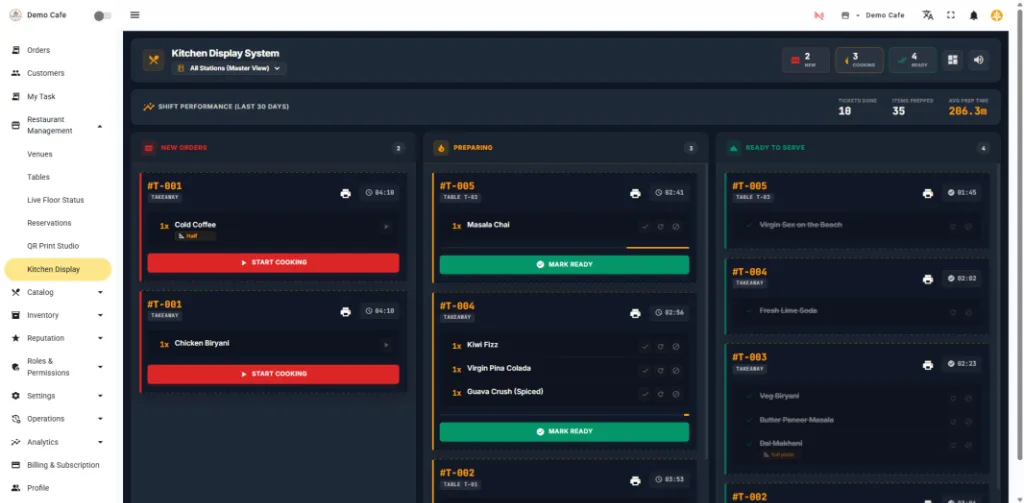
Kitchen view: station-filtered ticket queue with elapsed preparation counters and clear cooking modifier notes.
Keep Line Cooks & Expediter Synchronized
Replace paper clutter with reliable digital kitchen boards tailored to each prep counter.
Station-Specific Routing
Assign menu categories to dedicated screens. Bar staff see drinks; line cooks see mains; pastry chefs see desserts.
Elapsed Prep Timers
Tickets change color as orders approach service thresholds (Green -> Amber -> Red), alerting head chefs to delayed tables.
Expediter Pass View
Consolidated pass screen shows the head chef when all components of a multi-station table order are ready to leave the pass.
Eliminates the Bottlenecks in Food Service
Practical tools built for busy hot lines, beverage bars, and multi-brand delivery kitchens.
Clear Cooking Notes & Ingredient Modifiers
Guest special requests ("Less spicy", "No dairy", "Extra crispy") are highlighted prominently on tickets in high-contrast text, preventing costly dish remakes and guest complaints.
Real-Time Steward Coordination
Line cooks tap orders from 'Preparing' to 'Ready' with one touch. Stewards receive instant pickup alerts on their mobile waiter pads, keeping freshly plated food from sitting cold at the pass.
Multi-Brand Delivery Ingestion
For cloud kitchens operating multiple virtual brands, orders from Swiggy, Zomato, and direct channels feed onto a unified screen, clearly labeled by brand and packaging type.
Hybrid Screen + Thermal Print Support
Combine the speed of touchscreens with the permanence of physical thermal receipts. Keep digital tickets on the line while auto-printing customer delivery stickers at the packing station.
Connected with Front-of-House & Bar Stations
How the kitchen display integrates with registers, floor stewards, and food cost tracking.
Billing POS Register
Counter cashiers punch orders that sync to kitchen line screens instantly.
Smart Waiter Queues
Automated assignment ensures ready plates get picked up without delays.
Cloud Kitchen POS
Manage multiple virtual delivery brands on a single coordinated KDS line.
Inventory & Recipes
Orders prepped in the kitchen automatically deplete ingredient stock portions.
Kitchen Display System FAQ
Clear answers on hardware mounting, Wi-Fi connectivity, and kitchen line configuration.
How does multi-station ticket splitting work?
When a guest places an order (via register, QR code, or waiter app), Indostra automatically routes each item to its assigned preparation station. Beverage tickets print or display at the Bar, starters route to the Tandoor or Cold counter, and main curries display on the Hot Kitchen screen.
What hardware can we use for kitchen screens?
Indostra KDS runs in any modern browser. You can use standard Android tablets with silicone protective cases, iPads, or inexpensive wall-mounted Smart TVs connected via Wi-Fi or Ethernet.
Can we use both physical KOT paper slips and digital screens together?
Yes. Many kitchens prefer digital screens for line cooks while keeping a printed paper ticket for the expediter station. Indostra supports simultaneous screen updates and physical LAN thermal printing.
How do waiters know when food is ready for pickup?
When a chef taps an order as 'Ready' on the kitchen screen, the table steward's mobile waiter app updates instantly, signaling that the dish is plated and ready to be served.
Equip your kitchen with clear, reliable order screens
Set up Indostra KDS on your tablets or screens and eliminate lost paper tickets today.